Find Answers Fastin Our Knowledgebase

Explore our step-by-step guides, tutorials and expert tips to get the most out of your hosting experience. Our Knowledgebase is here for you 24/7, whether you're setting up a domain, managing WordPress, or troubleshooting.

knowledegebase

How to Retrieve a CSR from cPanel


Have you generated a Certificate Signing Request (CSR) from cPanel but lost it? Then, you can retrieve it. Follow this tutorial only if you have previously generated a CSR from cPanel.


1. Log in to your cPanel account.


2. In the Security section, click on SSL/TLS.

ssl-tls-icon.gif


3. Under the Certificate Signing Request, click on Generate, View or Delete CSR link.
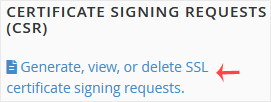
csr-select.gif


4. Under Certificate Signing Requests on Server, you can see previously generated CSR.


5. Click on Edit, which is located under the Action option.
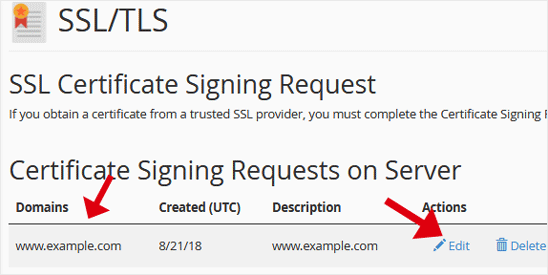
ssl-csr-retrive-edit-cpanel.gif


6. Copy the CSR code, located under the Encoded CSR. Please, copy it from/to:

-----BEGIN CERTIFICATE REQUEST-----

to

-----END CERTIFICATE REQUEST-----
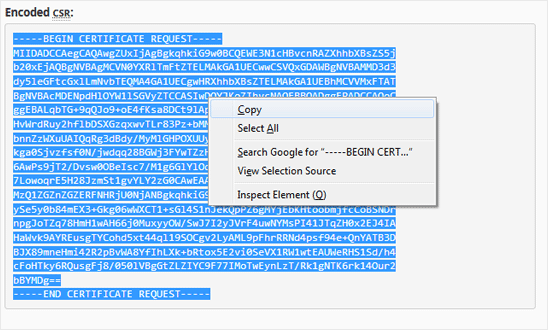
csr-code-copy.gif


Was this answer helpful?

« Back

Explore Latest News

Explore product announcements, hosting tips, security news, and digital trends to help you grow your online presence. Whether you're a developer, business owner, or startup, our blog keeps you ahead of the curve.

Our Partners

The delivery of secure, high-performance hosting worldwide is our mission, and our partners play a vital role in making it happen.

cloudlinux
cpanel
digicert
immunify360
litespeed
softaclus
tripleace