
Thunderbird is a friendly email client software for managing your email. You can set up a cPanel email account with Mozilla Thunderbird and receive/send the email.
1. Open Mozilla Thunderbird.

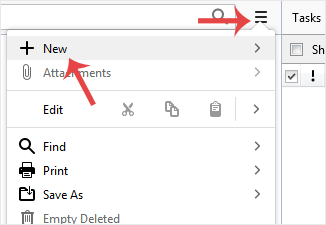
2. Click on the menu icon located on the right side of the screen and choose New. A drop box will open.
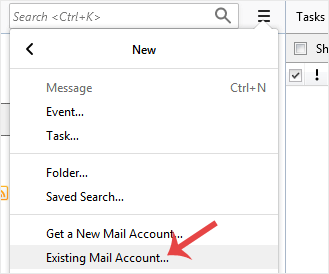
3. Click on Existing Mail Account.
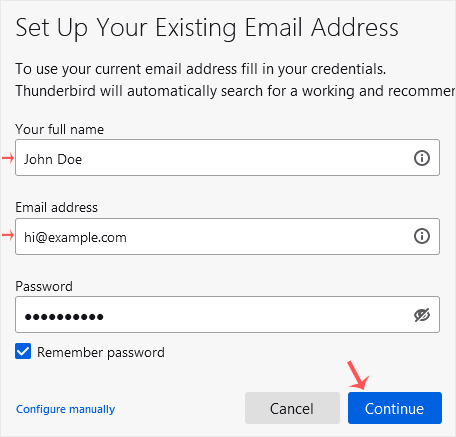
4. In the Mail Setup Account, fill out your name, full email address, and your email account password. Proceed with Continue.
5. It may take a few minutes to configure your email account. After that, click on Done.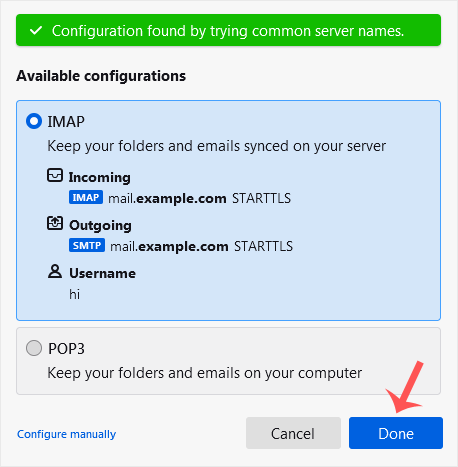
6. If it shows an SSL Security Exception, click on Confirm Security Exception and the warning will disappear.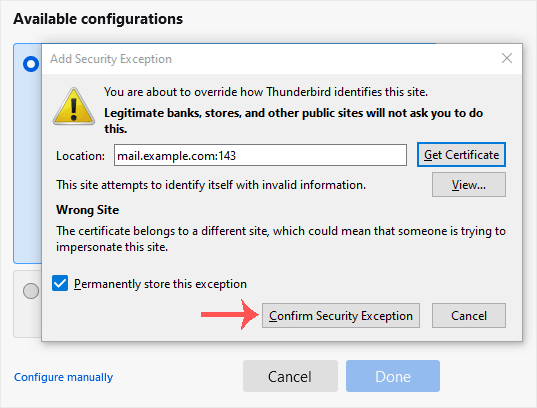
Congratulations, your email is set up successfully. You can now manage your email through Mozilla Thunderbird.
How to Setup a cPanel Email Account in Mozilla Thunderbird
0
Var dette svaret til hjelp?
Relaterte artikler
How to Check for New Email in Mozilla Thunderbird
Thunderbird is an email client software. You can work with it in the following way.
1. Open...
How to Send an Email Using Mozilla Thunderbird
You can send an email using Thunderbird. It is quite straightforward as you do not need to log in...
How to Delete Email Messages in Mozilla Thunderbird
You can easily remove email in Mozilla Thunderbird.
If you use the POP email protocol, the...
How to Reply to Email in Mozilla Thunderbird
You can reply to an email using Mozilla Thunderbird instead of the cPanel Webmail. 1. Open...
How to Forward an Email in Mozilla Thunderbird
You can forward an email to other email accounts using Mozilla Thunderbird. 1. Open Mozilla...


