
You can access the FTP account using the cPanel login details, which gives you full access to the home directory. However, if you want to create an FTP user account for a specific directory, you can create a separate FTP account.
1. Log in to your cPanel account.
2. In the Files section, click on FTP Accounts.

3. Under Add FTP Account, fill in the following details:
- Log in: Enter an FTP Username such as new-user (without space).
- Password: Enter your new password or use a password generator.
- Directory: For granting access to the entire directory of /public_html, enter
public_htmlor change the directory path to a sub-directory such aspublic_html/new-user. An FTP user doesn't have access outside the specified directory. - Quota: Specify the quota in numerical words or choose unlimited.
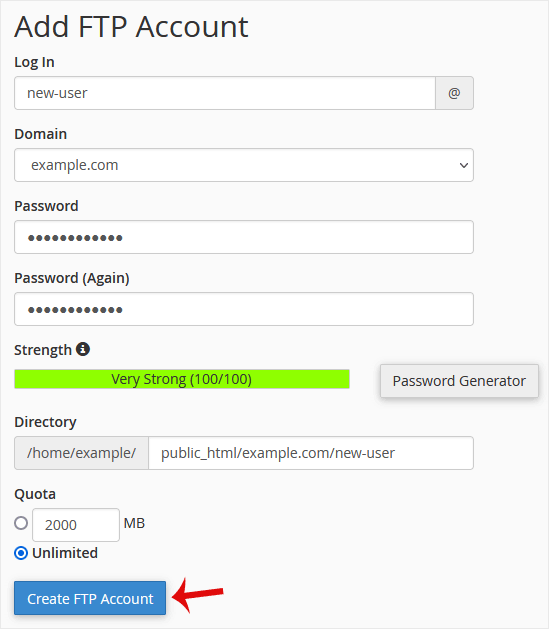
4. Click on Create FTP Account.
You can now access your new FTP account from the FTP client. The details are given below.
- Host: The IP address or the name of your website, such as ftp.example.com (replace example.com with your website address).
- Username: NewFTPUser@example.com.
- FTP Port: 21 (Default port is 21).
- FTP Password: Your FTP Password.


