Find Answers Fastin Our Knowledgebase

Explore our step-by-step guides, tutorials and expert tips to get the most out of your hosting experience. Our Knowledgebase is here for you 24/7, whether you're setting up a domain, managing WordPress, or troubleshooting.

knowledegebase

How to Set the PHP Version per Domain in cPanel


Do you have multiple domains and want to set the PHP version per domain? You can set PHP 7.0 on the Example2 domain and PHP 8.1 on Example1. You can do this in cPanel.


1. Log in to your cPanel account.


2. In the Software section, click on MultiPHP Manager.

cpanel-multiphp-icon.gif

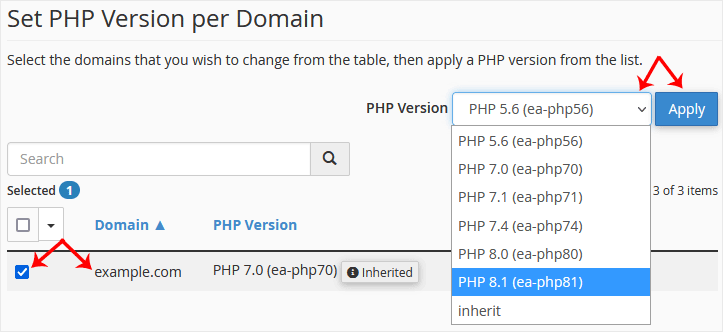
3. Scroll down to the bottom of the page. Select your domain from the left side of the screen. You can view the PHP Version from the drop-down menu on the right. Please, select the appropriate PHP version from it and click on Apply.
cpanel-multiphp-select-domain-full.gif

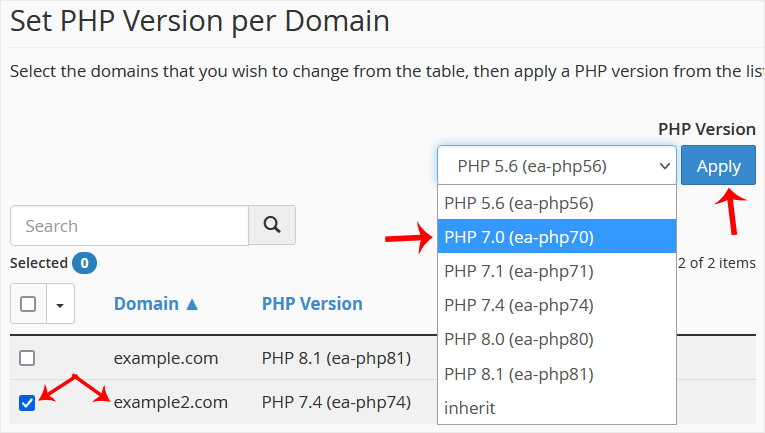
4. Now you want to set PHP 7.0 on Example2. Scroll down and select the example2 domain. Then set the PHP version to 7.0.
cpanel-multiphp-select-second-domain.gif


Congratulations, both of your domains are now using different PHP versions.


Was this answer helpful?

« Back

Explore Latest News

Explore product announcements, hosting tips, security news, and digital trends to help you grow your online presence. Whether you're a developer, business owner, or startup, our blog keeps you ahead of the curve.

Our Partners

The delivery of secure, high-performance hosting worldwide is our mission, and our partners play a vital role in making it happen.

cloudlinux
cpanel
digicert
immunify360
litespeed
softaclus
tripleace