
You can send an email using Thunderbird. It is quite straightforward as you do not need to log in to the cPanel webmail manually. You can send an email directly using the Mozilla Thunderbird email client.
1. Open Mozilla Thunderbird.
2. On the left side of the top menu, click on Write. 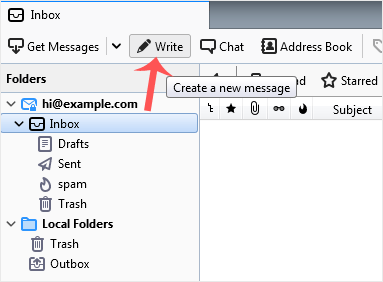
If you have multiple email accounts, click on your account, and a drop-down menu will open. Then select the appropriate email and enter the email account of the person you want to send an email to in the To field.
In the subject field, enter the subject of your email, enter your message in the Message box, and then click on Send.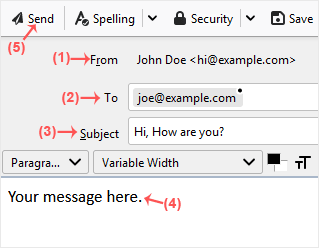
How to Send an Email Using Mozilla Thunderbird
0
Was this answer helpful?
Related Articles
How to Setup a cPanel Email Account in Mozilla Thunderbird
Thunderbird is a friendly email client software for managing your email. You can set up a cPanel...
How to Check for New Email in Mozilla Thunderbird
Thunderbird is an email client software. You can work with it in the following way.
1. Open...
How to Delete Email Messages in Mozilla Thunderbird
You can easily remove email in Mozilla Thunderbird.
If you use the POP email protocol, the...
How to Reply to Email in Mozilla Thunderbird
You can reply to an email using Mozilla Thunderbird instead of the cPanel Webmail. 1. Open...
How to Forward an Email in Mozilla Thunderbird
You can forward an email to other email accounts using Mozilla Thunderbird. 1. Open Mozilla...


