Find Answers Fastin Our Knowledgebase

Explore our step-by-step guides, tutorials and expert tips to get the most out of your hosting experience. Our Knowledgebase is here for you 24/7, whether you're setting up a domain, managing WordPress, or troubleshooting.

knowledegebase

How to Subscribe to an Invoice via PayPal


You can subscribe to an invoice for recurring payments. The subscription option is only available if you are purchasing a recurring service and the invoice due date is in the future.


1. Log in to your hosting client area.

2. Go to the Invoices section, open the unpaid invoice you want to subscribe to, and make sure you set the payment method as PayPal.


3. Click on the PayPal Subscribe.

paypal-subscribe-button.gif


4. PayPal asks you for login details. Enter your PayPal credentials and click Log in.
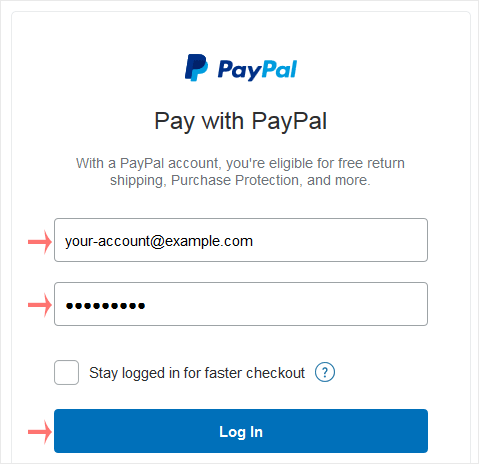
paypal-login-to.gif


5. Choose an appropriate payment source, such as your Debit Card or another method and confirm with Continue.
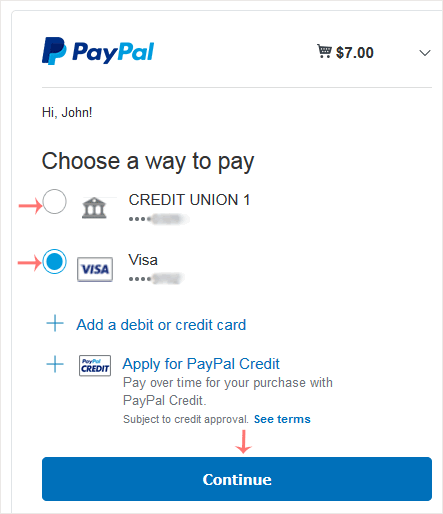
paypal-subscription-payment-source.gif


6. Check the details carefully and click Agree & Subscribe.
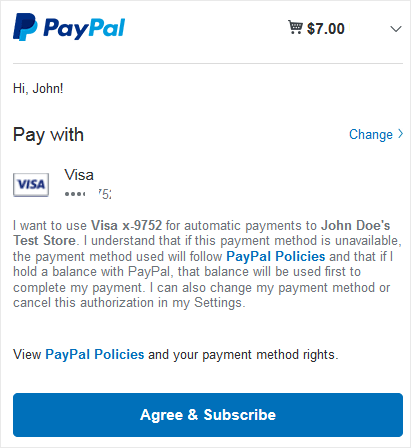
paypal-subscribe-accept.gif


If everything goes right, the system notifies you that you paid the money and created a subscription. If it shows a link to Return to Merchant, click on it, and in case it is not working, you can close the browser window.


Was this answer helpful?

« Back

Explore Latest News

Explore product announcements, hosting tips, security news, and digital trends to help you grow your online presence. Whether you're a developer, business owner, or startup, our blog keeps you ahead of the curve.

Our Partners

The delivery of secure, high-performance hosting worldwide is our mission, and our partners play a vital role in making it happen.

cloudlinux
cpanel
digicert
immunify360
litespeed
softaclus
tripleace